Sunday, May 29, 2011

Send Mail From Anyone To Anyone..


U heard it right! With this simple trick you can send anonymous emails from anyone to anyone with. You could send an mail from ur boss to his employess, and a lot of mischiefs.Here is the simple hack that let's you do just that using the most common feature available in all computers. Just follow the simple procedure. And so comment for any help.
1 Open the cmd prompt. (Start -> Run or press win key + R, then type cmd and presss OK )
2 Type telnet server.com 25 (where "server.com" is the name of the smtp (outgoing) server of your email provider, such as smtp-server.austin.rr.com). This can be found by checking your account info in the program you normally use for email.
3 Type HELO server.com. (Or "EHLO server.com")
4Type MAIL FROM:you@server.com.
5You may get a message saying "250 ok"
6Type RCPT TO:Friend1@anotherserver.com, friend_two@someotherserver.org, friend.3three@Someserver.com, etc.
7 again, You may get a message saying "250 ok"
8 To write the message, type DATA and press Enter.
On the first line type SUBJECT:yoursubject and press Enter twice.
Continue typing your message.
Put a single period (.) on a line by itself and press Enter to send your message. The server should say 'Message accepted for delivery'. (Or it says 250 OK id=`a long id`)
9Type QUIT to exit Telnet.
Ex:
$> telnet gmail.com 25
helo gmail.com
mail from: myblog@gmail.com
rcpt to: yourmail@yahoo.com
data
hi this is xxxxxx sending you a forged email
this is just for educational purpose only
don't misuse this trick
.
This will not work if your ISP uses dynamic IP to give you internet access. If you could try using some botnet server that is quite easy. If you would request would post a tutorial for that as well.
Well use the hack at your own risk as you can easily be traced back, as each email also sends your IP. You might use some IP re-routing software like anonymizer. But still use it cautiously. And this post was only for educational purpose.

 How To Manage Apple Devices Without iTunes ..


You must admit there is no device that meet standards of apple devices. There's no better alternative for ipod shuffle or nano till date.Only con of apple devices is that you couldn't use it without iTunes. However some people find iTunes clumsy. But with the help of some applications now you can manage your devices. Although there are plenty of them available on the web, these are some among them:
1. Media Monkey
2. IShuffle
3. Iphone explorer
MediaMonkey:Sync music and playlists to your iPod, iPhone, iPad, Android device, or most any other MP3 player, and let MediaMonkey convert unsupported formats and normalize volume levels on the fly.
iShuffle: With this application you could use your apple ipod almost like a USB memory stick
iPhone Explorer:iPhone Explorer lets you use an iPhone, iPod Touch or iPad as if it were in disk mode or a flash drive. iPhone Explorer is an iPhone browser for Mac & PC that lets you browse the files and folders on your iPhone as if it were a normal USB flash drive or pen drive. You can use the easy drag-and-drop methods to add or remove files and folders from the iPhone. Compatible with all iPhones and iPod Touches including the new iPhone 4 and iOS 4 firmware.
Though you could manage your apple devices with these you better use itunes to upgrade firmware and other operations like that.Have fun..

 iRing : One Ring To Rule Them All..


Ever thought about power of your finger?? iRing is a new stylish bluetooth enabled controller from apple to your finger :). You can contol your ipod,iphone functions like play,pause,volume,forward,lock with the help of this little ring.

iRing features a bright OLED status display with touch-sensitive function strip, and a rechargeable battery life of up to 2 days. Conveniently recharge your iRing using the included cradle. Its minimal size and unique ring-lock mechanism make it an ideal companion for charging and storing your iRing.

Last but not the least it looks amazing.

Chromium OS : Try Different..

For all internet freaks out there, here's an OS made for us by google  
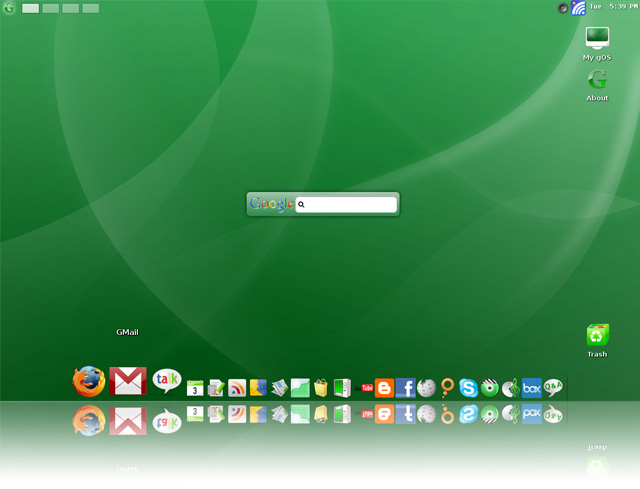
Google has already released plenty of information on their upcoming Chrome-based operating system but none of it actually explains definite features and functions. Nor has there been any talk as to what it will look like – openly.For those of you who aren’t aware of the upcoming Google Chrome OS, here’s a quick debriefing. Google has identified that users spend most of their time on a computer in a browser window (Internet Explorer, Firefox, Google Chrome, Safari). They believe that most of the excess programs and applications are used, much less often – enough so, that they don’t need to exist in an OS. They also believe that most average operating systems take an extended period of time to boot initially (no detesting that fact). Over time operating systems deteriorate in performance as more and more software is installed. Armed with all these aforementioned observations, Google has decided it would be beneficial to create an operating system that acts just as an internet browser. What that means is that every action performed on their upcoming OS will do so via the internet. The Google OS is titled the Chromium OS because it will obviously borrow from the design and function of Google’s Chrome internet browser. In a quick introductory video the Google development team also revealed that most files including music, text, video and such will be stored server side. Meaning computers utilizing the Google OS will no longer need extending storage support. Hard drives will likely become a feature of the past for Google OS users as music, photos videos and content is stored via internet accessible servers. Is this necessarily the best idea to be drawn up- no, I would think not considering all the safety problems that could potentially arise, however the idea is certainly not to be taken lightly. A speedy and reliable OS is certainly something that would remain on everyone’s radar. It would definitely function well for netbooks and portable devices which do suffer from performance loss due to traditional OS requirements.
Features
* OpenDNS added
* Audio support o VirtualBox - Intel 8x0 AC97 o VMware - Ensoniq AudioPCI 1371/1373
* SD card support (512M)
* Ethernet (DHCP)
* Mouse wheel support
* High-resolution support (800*600, 1024*768)
* Apps added o Software Directory o AndroidVNC o PilotLines, Craigs Races, Super Mario
* more net card driver added o Amd PCNET32 PCI o Broadcom 440x/47xx o CS89x0 o Intel PRO/100+ o NE2000/NE1000 o Realtek RTL-8129/8130/8139
FLOW is the latest tweaked version of Chromium OS by a developer named Hexxeh. You can Download the Chromium OS from HERE

Run Android On Your Pc ..


Ever imagined Androind running on pc or laptop. Well here it is Android OS finely ported to work on your pc. It might not be good for daily use but it is definately worth a try.You can download the os fromHERE

Vaio Zoom : Zooms into the Future..


Vaio Zoom laptop concept is one of the great laptop concept from Sony.It Features a holographic glass screen that goes transparent and a keyboard that turns opaque when turned off, it's slick and beautiful. And sure, a touch keyboard like this would be extremely annoying without haptic feedback and screens like that don't really exist yet, but it's an interesting look at what we'll be playing with a few years down the line. Despite the fact that this isn't an official Sony concept, we still think they should work at making it a reality.

D-Roll : A Rock n Roll Laptop