Sunday, May 29, 2011

Send Mail From Anyone To Anyone..


U heard it right! With this simple trick you can send anonymous emails from anyone to anyone with. You could send an mail from ur boss to his employess, and a lot of mischiefs.Here is the simple hack that let's you do just that using the most common feature available in all computers. Just follow the simple procedure. And so comment for any help.
1 Open the cmd prompt. (Start -> Run or press win key + R, then type cmd and presss OK )
2 Type telnet server.com 25 (where "server.com" is the name of the smtp (outgoing) server of your email provider, such as smtp-server.austin.rr.com). This can be found by checking your account info in the program you normally use for email.
3 Type HELO server.com. (Or "EHLO server.com")
4Type MAIL FROM:you@server.com.
5You may get a message saying "250 ok"
6Type RCPT TO:Friend1@anotherserver.com, friend_two@someotherserver.org, friend.3three@Someserver.com, etc.
7 again, You may get a message saying "250 ok"
8 To write the message, type DATA and press Enter.
On the first line type SUBJECT:yoursubject and press Enter twice.
Continue typing your message.
Put a single period (.) on a line by itself and press Enter to send your message. The server should say 'Message accepted for delivery'. (Or it says 250 OK id=`a long id`)
9Type QUIT to exit Telnet.
Ex:
$> telnet gmail.com 25
helo gmail.com
mail from: myblog@gmail.com
rcpt to: yourmail@yahoo.com
data
hi this is xxxxxx sending you a forged email
this is just for educational purpose only
don't misuse this trick
.
This will not work if your ISP uses dynamic IP to give you internet access. If you could try using some botnet server that is quite easy. If you would request would post a tutorial for that as well.
Well use the hack at your own risk as you can easily be traced back, as each email also sends your IP. You might use some IP re-routing software like anonymizer. But still use it cautiously. And this post was only for educational purpose.

 How To Manage Apple Devices Without iTunes ..


You must admit there is no device that meet standards of apple devices. There's no better alternative for ipod shuffle or nano till date.Only con of apple devices is that you couldn't use it without iTunes. However some people find iTunes clumsy. But with the help of some applications now you can manage your devices. Although there are plenty of them available on the web, these are some among them:
1. Media Monkey
2. IShuffle
3. Iphone explorer
MediaMonkey:Sync music and playlists to your iPod, iPhone, iPad, Android device, or most any other MP3 player, and let MediaMonkey convert unsupported formats and normalize volume levels on the fly.
iShuffle: With this application you could use your apple ipod almost like a USB memory stick
iPhone Explorer:iPhone Explorer lets you use an iPhone, iPod Touch or iPad as if it were in disk mode or a flash drive. iPhone Explorer is an iPhone browser for Mac & PC that lets you browse the files and folders on your iPhone as if it were a normal USB flash drive or pen drive. You can use the easy drag-and-drop methods to add or remove files and folders from the iPhone. Compatible with all iPhones and iPod Touches including the new iPhone 4 and iOS 4 firmware.
Though you could manage your apple devices with these you better use itunes to upgrade firmware and other operations like that.Have fun..

 iRing : One Ring To Rule Them All..


Ever thought about power of your finger?? iRing is a new stylish bluetooth enabled controller from apple to your finger :). You can contol your ipod,iphone functions like play,pause,volume,forward,lock with the help of this little ring.

iRing features a bright OLED status display with touch-sensitive function strip, and a rechargeable battery life of up to 2 days. Conveniently recharge your iRing using the included cradle. Its minimal size and unique ring-lock mechanism make it an ideal companion for charging and storing your iRing.

Last but not the least it looks amazing.

Chromium OS : Try Different..

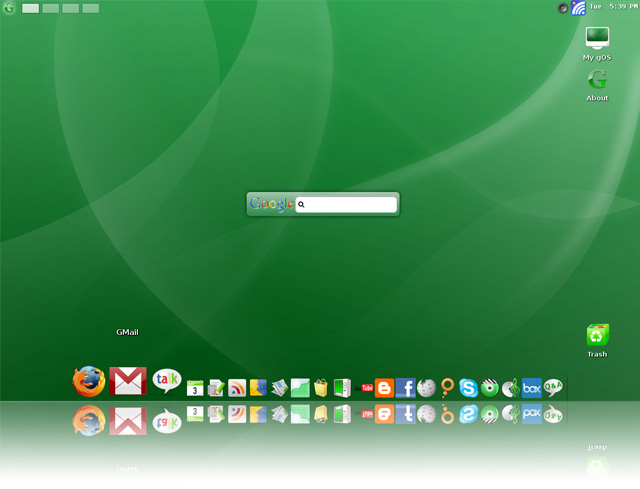
For all internet freaks out there, here's an OS made for us by google  
Google has already released plenty of information on their upcoming Chrome-based operating system but none of it actually explains definite features and functions. Nor has there been any talk as to what it will look like – openly.For those of you who aren’t aware of the upcoming Google Chrome OS, here’s a quick debriefing. Google has identified that users spend most of their time on a computer in a browser window (Internet Explorer, Firefox, Google Chrome, Safari). They believe that most of the excess programs and applications are used, much less often – enough so, that they don’t need to exist in an OS. They also believe that most average operating systems take an extended period of time to boot initially (no detesting that fact). Over time operating systems deteriorate in performance as more and more software is installed. Armed with all these aforementioned observations, Google has decided it would be beneficial to create an operating system that acts just as an internet browser. What that means is that every action performed on their upcoming OS will do so via the internet. The Google OS is titled the Chromium OS because it will obviously borrow from the design and function of Google’s Chrome internet browser. In a quick introductory video the Google development team also revealed that most files including music, text, video and such will be stored server side. Meaning computers utilizing the Google OS will no longer need extending storage support. Hard drives will likely become a feature of the past for Google OS users as music, photos videos and content is stored via internet accessible servers. Is this necessarily the best idea to be drawn up- no, I would think not considering all the safety problems that could potentially arise, however the idea is certainly not to be taken lightly. A speedy and reliable OS is certainly something that would remain on everyone’s radar. It would definitely function well for netbooks and portable devices which do suffer from performance loss due to traditional OS requirements.
Features
* OpenDNS added
* Audio support o VirtualBox - Intel 8x0 AC97 o VMware - Ensoniq AudioPCI 1371/1373
* SD card support (512M)
* Ethernet (DHCP)
* Mouse wheel support
* High-resolution support (800*600, 1024*768)
* Apps added o Software Directory o AndroidVNC o PilotLines, Craigs Races, Super Mario
* more net card driver added o Amd PCNET32 PCI o Broadcom 440x/47xx o CS89x0 o Intel PRO/100+ o NE2000/NE1000 o Realtek RTL-8129/8130/8139
FLOW is the latest tweaked version of Chromium OS by a developer named Hexxeh. You can Download the Chromium OS from HERE

Run Android On Your Pc ..


Ever imagined Androind running on pc or laptop. Well here it is Android OS finely ported to work on your pc. It might not be good for daily use but it is definately worth a try.You can download the os fromHERE

Vaio Zoom : Zooms into the Future..


Vaio Zoom laptop concept is one of the great laptop concept from Sony.It Features a holographic glass screen that goes transparent and a keyboard that turns opaque when turned off, it's slick and beautiful. And sure, a touch keyboard like this would be extremely annoying without haptic feedback and screens like that don't really exist yet, but it's an interesting look at what we'll be playing with a few years down the line. Despite the fact that this isn't an official Sony concept, we still think they should work at making it a reality.

D-Roll : A Rock n Roll Laptop


Charge Battery at a Flick of your Finger..


Basically how it works is it slot for finger contains micro motors that convert the motion into electricity.Designers Song Teaho and Hyejin Lee may not call this a “green” concept, but finger powered batteries are eco-friendly. If your cell phone is running low on battery power, you pull out the battery and spin it around your index finger. It will be recharged long enough to let you have a conversation or to get to a electrical charger. It would be great to see this developed to last longer.

How To Make Small Sky Lanterns..


Isn't It a beautiful sight to watch a Flying Sky Lantern in the sky. Also an perfect thing as a decorative in celebrations or to release a lantern in the sky with words written on it.Chinese sky lanterns are a festive way to fill the night sky with beautiful glowing lights.Creating a Chinese sky lantern requires only a few materials and a little patience. Soon you will have your very own glowing, flying lantern hanging from the sky.
Well its quite simple to make a sky lantern, Just follow these simple steps with some precautions:
1.Cut out two 2-foot-wide and 3-foot tall rectangles from tissue paper. Spray these with flame retardant on each side and allow them to dry. Cut the upper right and left corners of each tissue paper sheet. Brush on a thin coat of Elmer's glue on the top, left and right side edges of each piece of tissue paper. Do not glue the bottom edge. Press these pieces together and allow them to dry.
2.Hot-glue two fishing hooks together so that the hooks are upside down and pointing out. Wrap a candle wick string around the fishing hooks to form a ball.
3.Soak two 3/32-by-18-inch balsa wood dowels in a bucket of water for 24 hours. This will make them extremely pliable. Bend these two dowels into a circle and tie them together. Lay two dowels across this hoop so that the dowels intersect the hoop vertically and horizontally. You can also purchase pre-made circular dowel wood from a craft store.
4. Cut four lengths of string into 6-inch segments and spray with flame retardant. Tie all four of these strings to the hoop. Tape the tips of the string inside the tissue paper bag.
5. Soak the ball of wick in alcohol. Have a friend hold the bag up and slightly open as you place the wick ball on the hoop frame. Carefully light the wick ball with a long match. Allow the bag to begin to inflate with hot air before letting go.

Chevrolet Volt : Future Proof Car


Say hello to the Volt, Chevrolet's new electric vehicle that can use gas (but only if you need to).It has Electric drive unit with 150 hp, 273 lb-ft of torque, an quiet on-board generator/engine, 1.4L Internal Combustion Engine (80 hp).Bluetooth® wireless technology for select phones.Bose® Premium speaker system with 6 speakers and subwoofer.Hard drive, 30 GB of audio data storage.

Volt dashboard has two LCD screens that display speed, battery power, range to recharge or re-fill as well as an efficiency gauge that gives you real-time feedback. On the center console you'll find a seven-inch diagonal high-resolution screen with touch-sensitive control that helps you get the most out of your Volt.

The Volt runs on electricity for an initial range of 35 miles on a single charge, before a gas generator seamlessly creates electricity for up to 340 additional miles on a full tank of gas.Volt would cost around 13-17 lakhs

How To Show Fake Depth Of Field Using Photoshop ..


Depth of field (DOF) is the distance between the nearest and farthest objects in a scene that appear acceptably sharp in an image.

The area within the depth of field appears sharp, while the areas in front of and beyond the depth of field appear blurry.
We can set the DOF in most of the cameras before the shot. But with the help of this tutorial u can fake the DOF in any pic using photoshop,by following these simple steps:
1. Open your photo in photoshop, make sure you are in RGB mode.Image > Mode > RGB.
2.Click the Channels tab on your layer pallet (if not visible, Window > Channels). Click the small arrow (you can find this besides tabs channels), and select new channel. This will be your “Blur channel”.
3.Now, with the gradient tool set to black and white linear, make a gradient(to make a gradient click the pointer on the pic from left to right in case of the 1st pic in this post, u'll get red color gradient model) so that the area you want in focus is roughly covered with black.
4.Enable the RGB channel (Clicking the box where an eye will appear), you will see the area selected to blur as a glow.Before you continue – make sure that the RGB channel is ’selected/highlighted’ in the pallet, the filter will not work if you have the channel you made selected!
5.Now Go back to layers tab and select your layer. Filter > Blur > Lens Blur. Make sure your source is set to “Blur Channel” or whatever you called the new channel previously. Blur focal distance can be used to change DOF, and all other settings are just for minor adjustments,and you could finally remove the blur channel if u dont want the red thing.
6.Finally, a Brightness and Contrast layer,Layer > New Adjustment Layer > Brightness & Contrast. Increase contrast somewhat, and adjust brightness to keep it looking realistic.(Optional Step)
Well this is one accurate method to show the DOF, check out the easy alternative method in this video tutorial:

Mozilla Seabird : an All in One device..


Mozilla Seabird is a new concept by mozilla labs which shows us a future where we have to carry just one device for all our technology needs. It threatens to replace traditional desktops, laptops and even tablets. The device was conceptualized a few years ago, and it seems that the base technology to run this magical device is finally catching up. You never know when your next Android phone might pop out a projected keyboard from the sides. Watch the video below for a sneak peek:

Spice Mi 270 : Cheapest Android Dual Sim Phone


Breaking the records of micromax android phones spice mobile brings up its new android phone which claims to be cheapest android phone now available in the market.Mi-270 is India’s first Dual SIM (Dual Stand by , Single Talking) an Android 2.2 based, extremely user-friendly, feature packed phone that is provided with horde of services and applications, enabling users to access all that they want. Right from a range of business and personal applications, such as email, instant messaging, music, games & Internet applications, Mi-270 has lot to offer.The phone features a 7 cm QVGA Touch Screen with a resolution of 240 * 320 pixels and 2MP camera.

Key Features of Spice Mi-270
Dual SIM
Android V2.2 Froyo OS
2 MP Camera
Video Recorder & Player
GPS & AGPS
Wi-Fi Enabled
GPRS/WAP/MMS
The phone is priced at Rs 5600/- and is currently the cheapest phone featuring Android.

How To Do Light Painting ..


You can make some cool pics with a technique called light painting. Light painting is basically painting in dark location with a light source in hand, and while this is being done,your camera shutter is being exposed to the scene. So all need is a camera, light source, tripod(optional). Although its better to use an camera in Bulb mode, you can find this bulb mode in your camera settings, by setting your cam in bulb mode you decrease the shutter speed by that way we get longer time to record our art, in this mode when we press the button once the shutter opens and on another press it closes and saves the picture. Dont worry if you don't have the bulb option the shutter will will be open as long as you keep the button pressed. After you finished your painting camera would take a little time to process your painting.This technique takes a little time to grasp, but with some practice you can have lots of fun..
Video Tutorial:
http://www.youtube.com/watch?v=4IS-DBZEXcA

Adjust colours selectively with PhotoShop and Picasa..


wanna make pics like these???
You could selectively adjust colors to a photo in many ways by photoshop.
one way is to select the object you wanna colour using the selection tools like lasso tools, color range selection,etc best one though is to use the quick mask method. Now im not going to teach you how to use these tools, jst google themn they're quite simple. Now that you have selected the object, now invert the selection by invert selection option in selection menu(Select > Inverse). Next Add a new adjustment layer to the selected pixels by going to Layer > New Adjustment Layer > Hue/Saturation. Now if u wanna fade out the other area adjust saturation, if you want to change color adjust the hue levels,as simple as that
Another method in photoshop is to create an duplicate layer of the original but a faded one or colored one. and erase out the part you dont want to be coloured or faded.
This technique is also known as focal black and white in picasa. In picasa you could directly select the Focal B/W option in the effects and select the portion you wanna have color. Have Fun..

Tips to Download any Mp3 Song

Whats the best file hosting service??
No, its not rapidshare or megaupload, its Mediafire

And the best thing about mediafire is that its resumable unlike other file servers, also it has no wating time..
Now about the MP3 songs, to download them go to google or the adress bar(in case of chrome) and type as below without the ' & +
'ur mp3 song name' + ' mediafire'
the very first link you get from the search would be your requested song. in some cases u might be required to include your album name..
Incase to you still dont get the song try this:
'Your song name' + '4shared'

Saturday, May 28, 2011

Download Files from RapidShare,MegaUpload etc Without any Premium Account..


Rapidshare is the most popular file hosting service in the world. But it has its own limitation so as most of file servers out there like megaupload, fileserve etc. Those limititations may include waiting time, non resumable links, non parallel downloads etc. To overcome those without premium accounts there are only two better ways.
One is to use a rapid leecher. rapid leacher is a program which when given the file adress, download adress downloads the entire file to its server and gives us an better resumable link to download that file. There are many websites out there which serve as rapidleecher, one of em is
Rapid8

if the above leecher doesnt work just google for other leechers
Second method is to use a software to download files.There are many softwares to do that, one of them isRapidshare Direct Download
My personal though is JDownloader, as it supports a wide range of file hosters including Youtube

How to Unlock an Iphone 4 for any Network


To get started with unlocking your iPhone, you'll need to jailbreak it first. To Jailbreak iPhone Simply point the browser at jailbreakme.com (or try the alternate site at jailbreakme.modmyi.com if it hangs on the purple screen) and slide your finger across the unlock panel. The entire process takes three minutes and doesn’t require a reboot.
Once the jailbreak is complete, it adds the Cydia icon to the homescreen, and from there you can start tapping into all of the jailbreak apps that Apple doesn’t allow in the App Store.Then, download the ultrasn0w app from Cydia (the jailbreak version of the App Store), install it, and once it’s complete, you can use a SIM card from any carrier. It’s that simple! :-)

Play Angry Birds On Chrome :)


The world Famous Angry birds has now arrived on Chrome Web Browser.Now you can install the first batch of Angry birds levels from chrome.angrybirds.com which is available for free by Google and Rovio. This new version includes few personal touches like Google Bombs, Colour Scheme and Mighty Eagle features which helps you to clear difficult levels. Also it is seen that it is not only playable in Chrome but it can also be played on other webbrowsers like Mozilla Firefox 4 too without installing any patch. So install and Play Angry birds on Web browser now.

How To Get Surround Sound Effect with your Speakers

Earlier the audio was played on a single speaker or collection of speakers positioned behind the screen. But today people expect to hear sound coming from every direction. Surround sound is an effect which makes the listener feel of being present at the Event, mostly observed in movie theatres.To get surround sound u need to know the posion of speakers, surround speakers and your subwoofer. You should have a minimum of 2 speakers, but a set of 5 or 8 is mostly preferred. This collection of speakers should be placed as below:


video tutorial:

Nokia Kinetic : A Phone that Stands Up ..


Nokia Kinetic is a new concept phone designed be nokia. This phone is not called Kinetic Just for fun, this phone has electro-magnetic base which causes the phone to stand-up when a call is recieved. To reject a call simply tap on the phone and it will go back to its previous position.This feature is especially useful for video calling purposes and also can be used as a better way to view videos rather than with a kick stand.It has a borderless touchscreen, camera and an usb port. While it all looks great in photos, the phone seems to be litlle bit thick for the pockets.. :-)

Audi A9 : A Car That Repairs Itself and Changes Colour..


The awesome A9 concept will be lighter than Audi’s current flagship model, A8.A9 concept is a low emission hybrid vehicle for the future. A9 concept features a single-piece windscreen and its roof is formed from nanotechnology material (which is yet to be discovered) that has a unique automatic-system that repairs damage and can also be adjusted for colors and opacity.

Also, the vehicle flaunts the unique ‘electronic painting’ system that allows the owner to change the color with the touch of a button. The concept is proposed to be powered by an advanced hybrid setup which uses an internal combustion engine working in conjunction with four in-wheel electric motors.